Show only unread or flagged or today's mail in Outlook
I use this filter so that I can manage my inbox in Outlook. It means that once I’ve read a message, it isn’t shown unless I flag it. I also have a filter that keeps today’s mail shown too.
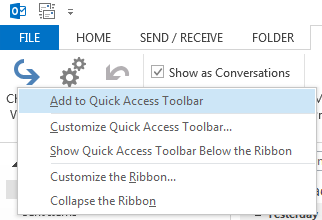
Adding the “Change View” option to the quick access toolbar makes changing between views less painful. Go to the “View” ribbon, right click “Change View” and choose “Add to Quick Access Toolbar”:
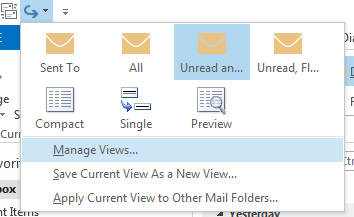
Select “Manage Views”:
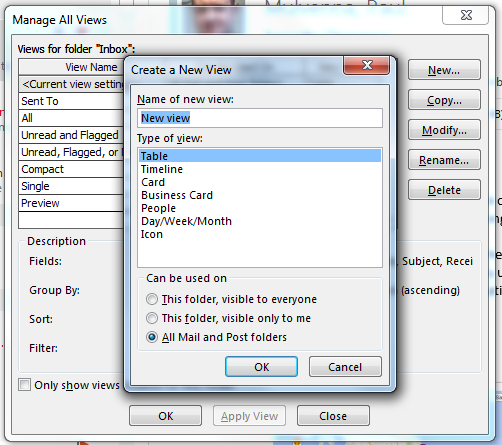
Select New, give it a name and hit OK:
Select “Filter”, and enter one of these.
Only unread and flagged:
("urn:schemas:httpmail:read" = 0) OR ("http://schemas.microsoft.com/mapi/proptag/0x10900003" > 1)Unread, flagged and today’s messages:
("urn:schemas:httpmail:read" = 0) OR ("http://schemas.microsoft.com/mapi/proptag/0x10900003" > 1) OR ("urn:schemas:httpmail:datereceived" >= 'Today')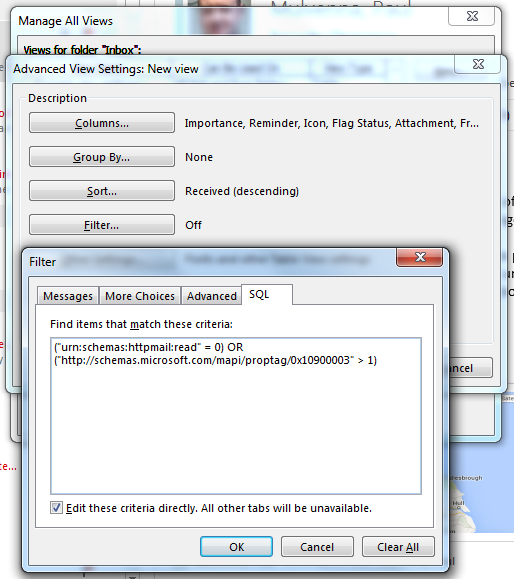
Hit OK a few times and then select your view. Sorted.